

🎶 From Chaos to Harmony: The Journey of a 20-Year-Old Music Library into Spotify Playlists 🎵
Imagine this: a treasure trove of over 5,000 songs meticulously collected over two decades, scattered across an old Linux-based file system like hidden relics in a dusty library. It wasn’t just a music collection; it was a timeline of memories, moods, and milestones. But how do you bring such an epic archive into the modern age of Spotify playlists? Welcome to a journey of coding, automation, and good old-fashioned perseverance.
🖥️ The Beginning: Linux Basics and the First Steps
The first challenge? Extracting the titles from the maze of files. Linux came to the rescue with its timeless command-line magic. A simple yet powerful command turned chaos into clarity:
find . -type f -exec sh -c 'basename "${1%.*}"' _ {} \; > output1.txtTIP
This single line exported every song title into a clean, organized text list. It was a small victory, but the road ahead was anything but simple.
✨ Organization: The Hidden Hero
Looking back, the decision to organize filenames with consistent patterns was the unsung hero of the operation. Thanks to past efforts, song titles were more than just strings of random characters—they were recognizable, matchable, and ready to be processed. Every bit of effort saved hours of manual labor during the journey to come.
🐍 Enter Python: Automating the Match Game
With a clean list of titles in hand, the next step was to bridge the gap between the local library and Spotify. Python became the knight in shining armor, wielding the Spotify API like a pro. A custom app was born to:
- Query Spotify for each song title.
- Compare results and log exact matches into a playlist.
- Export a "found" list for further analysis.
INFO
Not every song found its digital twin. A difference list emerged—songs that Spotify couldn’t match to its catalog. The mission wasn’t over.
📜 The Struggle with Text Analysis
One of the more frustrating challenges? Textual similarity. Why is "XXX - YYY" so different from "12 XXX feat. AAA - YYY (Original Mix)" to machines? Even advanced AI tools like GPT-4 struggled to make sense of these nuanced differences. After a few experiments, the conclusion was clear: this was a job for humans and their trusty command-line tools.
TIP
Regex like this helped preprocess the text for better matching:
# Remove text within parentheses and all text after it
line = re.sub(r'\s*\(.*?\).*', '', line)
# Remove numbers and special characters
line = re.sub(r'[^a-zäöüß() ]', '', line)
# Replace multiple spaces with a single space
line = re.sub(r'\s+', ' ', line)
Commands like this further helped dissect the diff list and identify patterns:
diff -y --suppress-common-lines mix-more.txt mix-more.found.txt | awk -F '\t' '{if ($2 == "|") print $1 > "file1-difflines.txt"; else if ($2 == "<") print $1 > "file2-difflines.txt"}'🤹♂️ The Human Touch: Tackling the Diff List
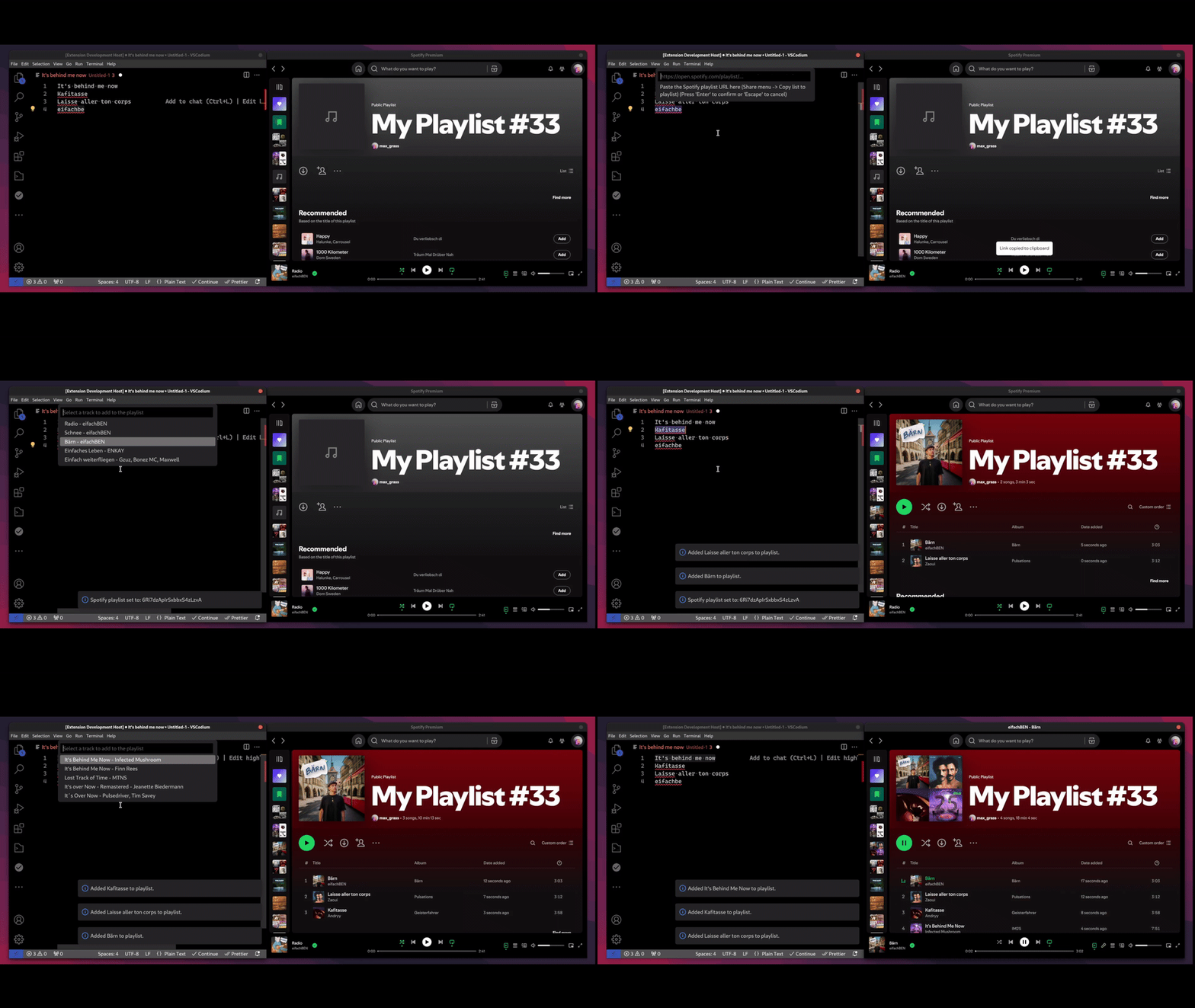
Faced with a stubborn list of unmatched songs, automation passed the baton to manual intervention. Another custom tool was created—this time as a VSCodium extension written in JavaScript. It allowed for:
- Searching Spotify directly from the editor.
- Selecting the best match from search results.
- Adding the song to a playlist with a single command.
Slowly but surely, even the most elusive tracks found their way into Spotify.
🚀 The Outcome: A Symphony of Automation and Collaboration
The result? A fully modernized music library, now alive and well in Spotify playlists. It was a journey of cross-domain coding, blending Python, JavaScript, and a fair share of command-line wizardry. Along the way, an open-source VSCodium extension was born—a tool that’s now available to help others on similar journeys.
💡 The Takeaway: Innovation, One Playlist at a Time
This wasn’t just about bringing an old library into the present; it was a reminder of how powerful coding can be when it bridges the gap between tools, platforms, and human creativity. The Spotify Search and Add extension is more than a utility—it’s proof that even the most daunting tasks can be conquered with the right blend of automation and persistence.
References
- Spotify Search and Add Extension
- Or search for "Amathron Add to Spotify" in the VSCodium extensions marketplace.
INFO
Stay tuned, stay organized, and as always—stay healthy. 🚀