How do you use free cloud services?
Let's store smarter in the cloud, manage the cloud effectively, while retaining ancient templates and files stored locally, which we haven't accessed for 5 years and won't in the next 5 years (or delete them alltogether).

The idea is simple - start X-App, log in, and in a few hours, get a brand new (or format C: old) computer ready for offline operation.
Portable applications are intended for another post, but we can still include some frequently used apps like PotPlayer, 7-Zip, Notepad2 in the cloud. For other applications, we still need an external 1Tb hard drive (offline).
OneDrive
(formerly SkyDrive) with its 25GB as a main memory for frequently used files (ROAMING). Each of us has a few PDF books and documents, some organize music locally and mostly listen to 10-15 GB of favorite mp3 tracks. A few videos for Full-HD tests, funny videos that YouTube constantly rejects, or anything else you might like.
Most videos are already stored on YouTube from creation and don't need a second "ROAM" copy. I recommend organizing all archived projects and old receipts, documents, certificates, and storing them either locally (if they're too big - e.g., scans, videos, etc.) or in an archive folder on SkyDrive.
"Ok, Doc", (c) but in my opinion, Dropbox is more user-friendly and I use it for everything!
Dropbox
is "OK" for iPhone/Pad Photostream, offering automatic synchronization for 15GB compared to Apple's 5 GB! You can manage temporary archives like photos or installers through the user-friendly web interface. Some services (e-book readers, etc.) unfortunately cannot use SkyDrive at this time, so if you want all templates for a specific application in Dropbox, then no problem.
Google Drive's share
Occasionally, SkyDrive has issues with online editing of .doc and .docx files. I've never had bad experiences with Google Docs (15 GB).
That's it. The cloud is our present. Rely more on WiFi and mobile data than on our USB sticks, not just because it's more practical, but because it's cooler "😃"
Update 2014, Yunpan 360...
it topped them all! With 65TB cloud storage per person, the Chinese basically build enough storage for 100 years? With a clean website, synchronization app, browser app (without sync - WANGPAN), iOS/Android apps.
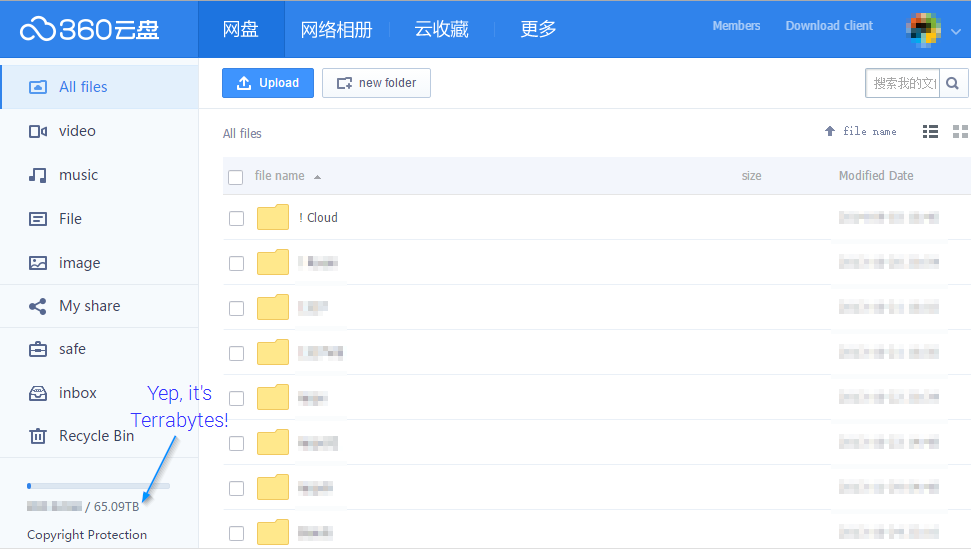
The only downside - photos are compressed when uploading/storing from/to mobile, which is unacceptable.
Simple solution: use Google Drive for photo management - 15GB for "Roaming" photos, not for all backups, which are still uploaded as files to YunPan from the computer.
Folder and data structuring TIP
Create two folders: !cloud and zStatic.
TIP
!cloud - (with "!" in front, so it appears first in the cloud) for files that are only stored in the cloud (and on an external TB hard drive as backup), and
zStatic - for local files that don't need to be synchronized between computers. These are primarily folders and projects possibly covered by other synchronization services, e.g., git/github code projects, Google Drive, OneDrive, or Dropbox, as well as temporary files (Desktop/Downloads, etc.) and large files like images (only store temporarily).
By excluding these folders on every (or new) computer, we create a clean synchronization environment.
Good luck!
Remarks 2023
- Yunpan died as quick as it came to life. About 1 year and it's gone. So would be your data, unless... you got it - you'd made a backup.
- Private and Selfhosted Clouds are the "new" Clouds.
- The evolution and current articles of this blog are aimed to #Digital/#Online Freedom from Google/Microsoft/Apple/PRC_OS.